


Introduction to Programming and C++#
The C++ Language#

C++ is
A high level language
A powerful, battle tested language (old), with new standards every 3 years.
A multiparadigm language (we will learn only a subset)
A compiled language (using compilers like
g++oricc)Highly performant, used vastly on scientific and many other applications: amazon.com, intel, IBM, facebook, Google, Microsoft, Apple, Adobe, …
Games written in c++: Assasins creed, Call of Duty, Mass Effect, World of Warcraft, Starcraft, Halo, Among Us, …
Aviation (10%) https://www.youtube.com/watch?v=Gv4sDL9Ljww
The role of AI in learning: https://www.anthropic.com/research/AI-assistance-coding-skills
If you want to enter the HPC world, you must learn some c++ (or C or fortran):
https://www.ictp.it/opportunity/master-high-performance-computing
https://csc.fi/en/training-calendar/csc-summer-school-in-high-performance-computing-2026/
https://eventi.cineca.it/en/hpc/cineca-summer-hpc-school-heterogeneous-computing-2025
The main idea at the end of this course is to be able to program something like
embed("https://www.youtube.com/watch?v=lS_qeBy3aQI")
 From: https://www.hackerearth.com/blog/programming-languages
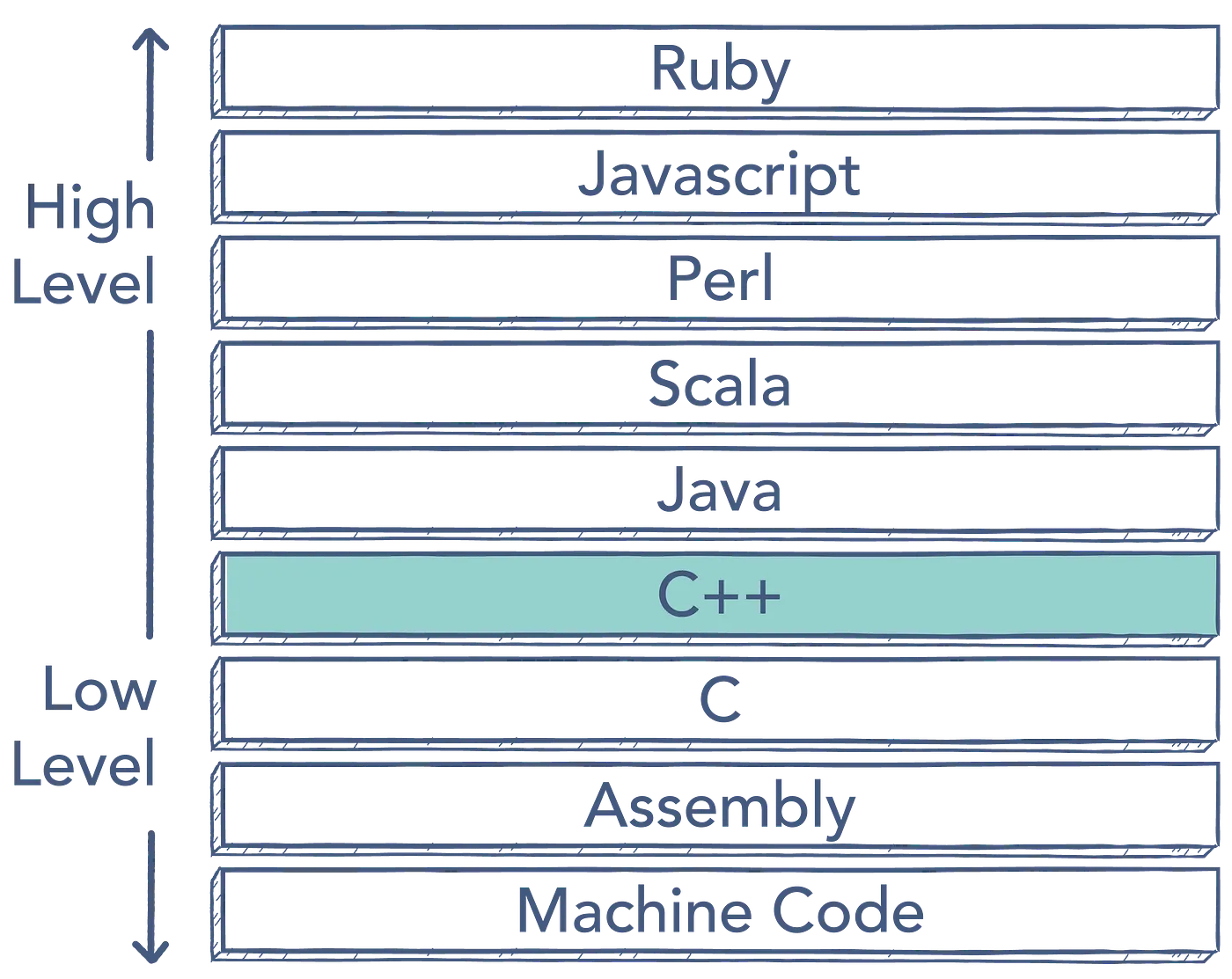 Some high and lovel languages
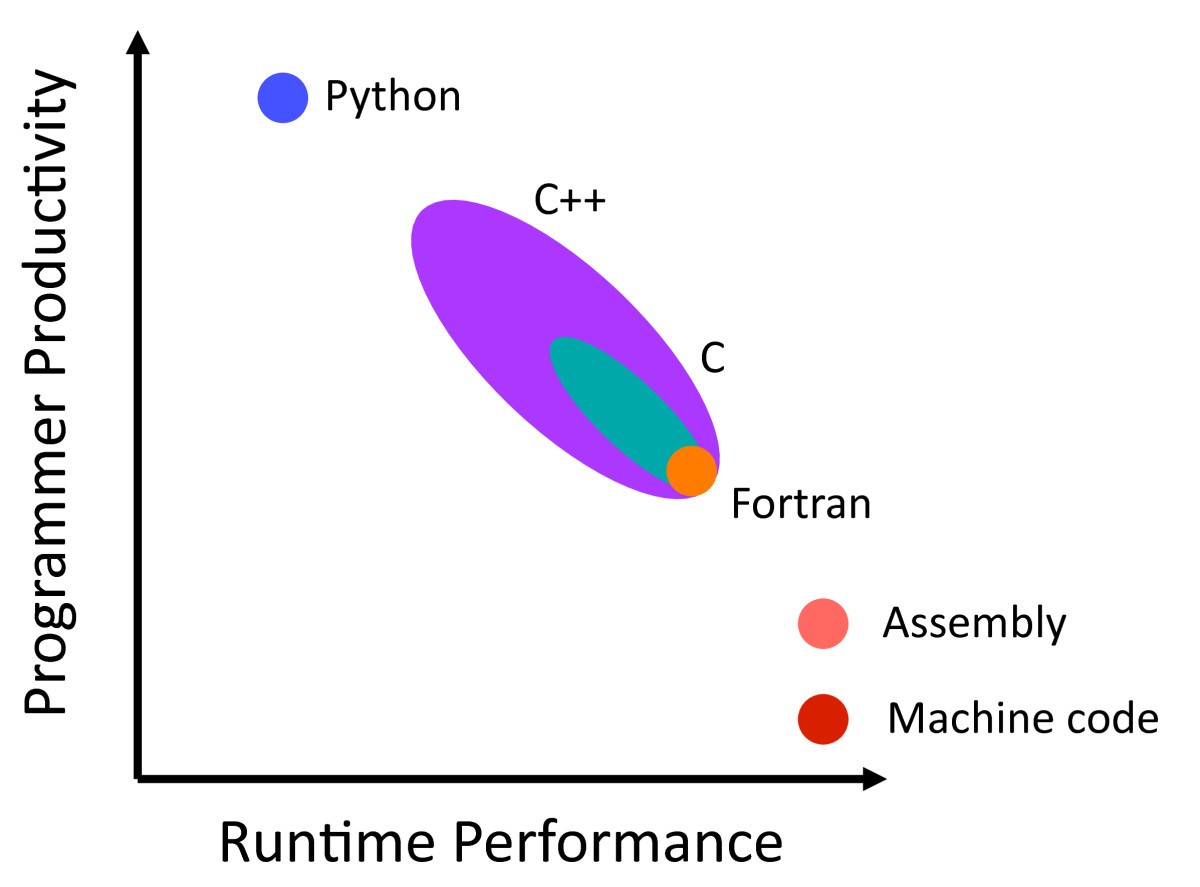 Performance and development time
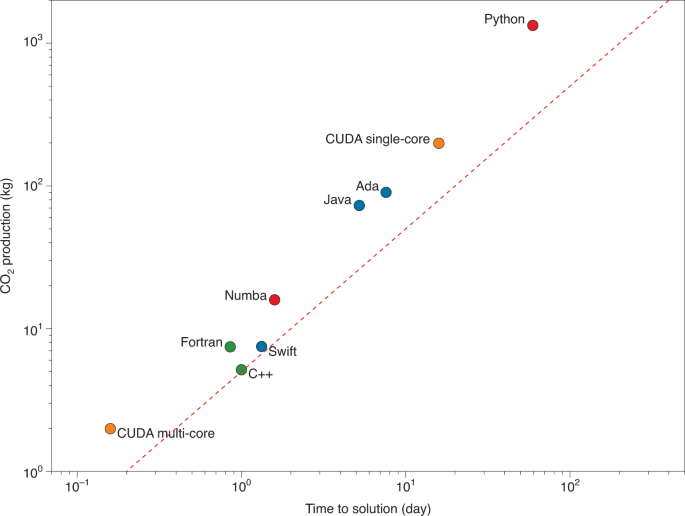 Carbon production estimation
C++ allows you to really exploit your computational resources: https://computers-are-fast.github.io/
Computer Hardware#
Also, if you want to know more about a computer, please check
Why c++ and not just python?#
In the context of 2026, learning C++ is arguably more valuable now than it has been in the last decade, particularly for Scientific Computing, High-Performance Computing (HPC), and Machine Learning (ML).
While Python remains the dominant “frontend” language for these fields, C++ is the “engine room.” Learning it allows you to cross the barrier from being a user of tools to a builder of them.
Here is a breakdown of why you should learn C++ this year, grounded in performance, evolution, and career differentiation.
The “Two-Language” Reality of ML and Scientific Computing#
In 2026, the industry has solidified into a two-tier structure.
Python is for exploration, prototyping, and glue code. It is easy to write but slow to execute (if you are not using libraries like numpy, pandas, polars, and so on).
C++ is for production, infrastructure, and optimization.
Why this matters: Almost every major Python library you use (NumPy, PyTorch, TensorFlow, SciPy) wraps a C++ or C backend.
The Differentiator: If you only know Python, you are limited to the performance of the libraries you download. If you know C++, you can write custom operators, optimize bottlenecks that Python cannot handle, and deploy models to environments where Python is too heavy (like embedded devices, robots, or high-frequency trading servers).
Job Market: Companies hiring for “ML Engineer” or “HPC Engineer” roles often pay a premium for candidates who can take a Python prototype and rewrite the critical paths in C++ for production.
Unmatched Performance & Control (HPC Context)#
In Scientific Computing and HPC, “close enough” is not good enough. You often need to squeeze every ounce of performance out of the hardware.
Deterministic Memory Management: Unlike Python (which uses a Garbage Collector that pauses your program unpredictably), C++ allows you to control exactly when memory is allocated and freed. In simulations or real-time processing, this determinism is non-negotiable.
Hardware Access: C++ gives you direct control over hardware resources, including SIMD (Single Instruction, Multiple Data) instructions and GPU compute kernels (CUDA is C++ based).
Energy Efficiency: As data centers face power constraints, “Green Computing” is becoming a priority. C++ programs generally consume significantly less energy than equivalent Python programs because they waste fewer CPU cycles.
The Evolution: C++ is “Modernizing”#
If you heard C++ is “scary” or “messy” years ago or on the internet, you should look again. The language has evolved massively with the C++20 and C++23 standards, making it more approachable for scientific work.
C++20 Modules: This fixes the archaic header file system, speeding up compilation and making code organization more like Python’s
import.Ranges (C++20): Allows you to compose algorithms in a readable, functional style (similar to Python’s lists or Linq) without sacrificing speed.
std::span&std::mdspan(C++23): These are game-changers for scientific computing. They provide a safe, standardized way to handle multi-dimensional arrays (like NumPy arrays) without the overhead of copying data.
Educational Value: Understanding the “Inner Workings”#
How a Computer Works: C++ forces you to deal with pointers, memory addresses, stacks, and heaps. You learn that “variables” are just labeled memory addresses. This demystifies how a CPU actually executes code.
Transferable Knowledge: Once you understand C++, learning other languages is easier because you understand the abstractions they use.
Example: When you learn “pass by reference” in Python or Java, it might seem abstract. In C++, you literally see that you are passing a memory address rather than copying a data value.
Example: You will understand why Python is slow (type checking at runtime, indirection) versus why C++ is fast (static typing, direct memory access).
Summary Table: Python vs. C++ in 2026#
Feature |
Python |
C++ |
|---|---|---|
Primary Role |
Prototyping, Data Analysis, Scripts |
Production, Infrastructure, Engines |
Execution |
Interpreted (Slow) |
Compiled (Native Metal Speed) |
Memory |
Automatic (Garbage Collection) |
Manual / RAII (Deterministic) |
HPC Use Case |
orchestrating simulations |
Running the simulation loops |
ML Use Case |
Designing/Training models |
Inference (Edge/Mobile), Custom Ops |
There are millions of Data Scientists who know Python. There are far fewer who can debug a segmentation fault in a TensorFlow custom kernel or optimize a simulation to run 100x faster. Mastering C++ signals that you are an engineer, not just a scripter. This extends also to computational modelling.
embed("https://computers-are-fast.github.io/")
from IPython.display import YouTubeVideo
YouTubeVideo("KpcRiUp_57g", width=640, height=350)
How does a cpu work? the cache importance
Typical basic programming workflow#
%load_ext nb_js_diagrammers
%%mermaid_magic -h 500
graph TD;
    A[Understand the problem] --> B[Edit the code: vscode, emacs, vim, ...]
    B --> C[Compile your code: g++ filename.cpp]
    C -- Yes --> D[Execute the executable: ./a.out]
    C -- No --> B
    D -- Yes --> E[Analyze results: Plot, fit, etc. Maybe use python]
    D -- No --> B
    E -- No, or improvement --> B
    E -- More thinking needed --> A
Understand the problem. Think about the tasks you need as a high level version.
Edit the code: vscode, emacs, vim, …
Compile your code:
g++ filename.cpp. In case of errors, return to step 1.Execute the executable:
./a.out. In case of errors, return to step 1.Analyze results: Plot, fit, etc. Maybe use python. In case of errors, return to step 1
The following shows the workflow for a helloworld program.
Step 0: Think#
We want a program that prints the message “Hello world” to the standard output (the screen, normally). So we need a standard header like iostream, and use std::cout. Therefore our general program flow would be
library to print to the screen: include `print` or `iostream`
in the main function
  use cout or print or println or printf to write "Hellow world"
Step 1: Edit#
We will edit the c++ code now. To do so, you need an editor.
Editors#
We need somethng to edit TEXT. Even though the cpp programs extension is .cpp, it is a text file. There are several editors, explore in the Develompment menu. We will use the now very famous VS Code, but others are Kate, VSCodium, Emacs, Zed, Vi, and so on. Notice that some of these editors are actually IDE.
Hello world program (using functions)#
Please use an editor and write the following code
// This is a comment
#include <print> // uses the modern print, c++23

int main(void)
{
    std::println("Hello world");
    return 0;
}
# This is a comment in python
def main():
    print("Hello from Python!")

main()

# This does not require compilation
# This is a comment in bash
echo "Hello from Bash!"
Step 2: Compile#
Now we will compile with the compiler g++ (there are a lot more). In a terminal, in the same directory where the fie was saved, just run
g++ -std=C++23 helloworld.cpp
Note
Executing bash commands in google collab
You have terminals available in a local or remote linux installation, in vscode in a code space, in binder, but not in google collab. There you need to either pay to have a terminal (is not that expensive), or just run a cell prepending ! as follows
!g++ helloworld.cpp
By default, the compiler produces the executable a.out (you can change the name using the compilation flag -o name.x), as
g++ -std=c++23 helloworld.cpp -o hello.x
You can check the contents of the current dir with
ls
(remember to prepend a ! if you are using collab)
Step 3: Execute#
To execute, we need to specify the path to the executable. We are going to use the symbol ‘./’, which means the current directory
./hello.x
(or ./a.out)
Congratulation! Now you are a c++ developer!
Tip
C++ cycle Remeber: You will always need to follow the cycle:
THINK -> edit -> save -> compile -> execute -> check -> THINK -> edit -> …
Understanding helloworld#
There are a lot of things under the hood for the simple helloworld program.
Pre-processor#
The lines like
#include <print>
#include <iostream>
#include <map>
Tells the pre-processor to include some part of the standard library. In this case, print (or the old iostream), is the one in charge of (i)npunt and (o)utput for the program. The library iostream is still needed to read from the standard input, std::cerr and std::clog for the standard error, and so on. There are many standard headers, and you should get familiar and use them extensively. Please see cppreference .
The pre-processor allows conditional compilation, activates possible parallelism with openmp and does many more things, but for now we will keep it usage like that. Actually, it is in the path to be eliminated in favor of modules.
Warning
Do not use .h headers. Those come from C , are not using the std namespace, and are a bad practice.
Warning
Do not use
using namespace std;
as in many web codes, that is a very bad practice.
Functions#
Good programming is based on splitting a daunting task into several smaller tasks that are isolated from each other and perform one thing well. Therefore, the concept of a function is of paramount importance. In c++, a function has a name, a set of arguments (parameters that it receives, like the domain, although the parameter number and type can be any), and a result type (a range) if it returns something. The typical function prototype is
return_type function_name(type1 par1, type2 par2);
As an example, the following is the declaration (how is called, what it receives and what it returns) for a that receives two integers and return their sum
int sum(int a, int b);
and this would be the implementation
int sum(int a, int b) {
    return a+b;
}
For reasons that we will learn later, modularization is very important.
The main function: Where all execution starts#
There is a very important function, called the main function, which is mandatory per program (and only can be per executable) and is the one that talks to the operating system. Usually, it is expected that the main function calls other functions in the program. Some signatures of the main function are
int main(void)
{
 ...
}
which means that the executable does not receive any arguments, or
int main(int argc, char **argv)
{
 ...
}
which mean that the executable can receive arguments, like
./program.x 1.2 3
Return statement#
The return statement allows to exit the function, returning something or nothing. It depends on your use case if you need it or not.
Practical exercise#
Now please write a program that reads your name, and then prints Hello, your-name-here . Check if it is better to use std::cin or std::getline. Compile it and test it. Ask the AI for at least three ways to do the same and to compare them.
# Compilation
# Execution
Some useful tools#
As you learn more and your apps grow in complexity, you might need to use tools to easy the developer work so to focus on the analysis and results, while mantaining readability and good practices. Please also focus in this in learning linux, is the environment that scientist use. You can find many online resources, like http://www.ee.surrey.ac.uk/Teaching/Unix/ or https://swcarpentry.github.io/shell-novice/. For a general overview of what it means to be a modern c++ developer, see https://roadmap.sh/cpp
Good programming practices#
Modularize your code
Use testing
Minimum privilige principle
A function does one thing right
Do not use
using namespace std;, https://stackoverflow.com/questions/11085916/why-are-some-functions-in-cmath-not-in-the-std-namespace/11086087#11086087Avoid code duplication
…
IDE#
An IDE is not just an editor but also gives you an environment with debuggers, refactoring, etc. You might use
Visual studio code . Very famous right now. Runs on electron. Can connect remotely, but cannot run in the terminal. A lot of metrics sent to servers.
VSCodium Free implementation, no telemetry. But not all plugins work.
Emacs doom or space emacs. Emacs distributions with many packages to make emacs a useful IDE.
Lapce A rust implementation which is very fast.
And much more: Sublime text, atom, Notepad++, Eclipse, Clion, Blocks , …
Sanitizers#
When compiling, use sanitizers to allow for runtime error detections
g++ -fsanitize=address,undefined,leak filename.cpp -o ...
Debuggers#
A programmer spent 80% of the time debugging and fixing its code, and 20% programming. To track errors, it is useful to use something more advanced than printing messages (poor’s man debugger). You can use tools like:
The debuggers included on visual studio code, emacs or the IDE you selected (they basically use gdb under the hood)
Linters#
Sometimes you need tools that tell some possible errors in your code without actually running it. You can use
Formatting#
Formatting the code is key for readability of one self and others. You can use something like clang-format to format your ugly and unreadable code.
Compilation#
There are several compilers that you can use, like:
Amd compilers Sometimes it is useful to try several compilers to find possible bugs in the code.
There are also some online alternatives, useful to test code and small projects (see also the debugging section)
As your code grows in complexity (but even in the case of simple projects), the constant compilation, debugging, linting, etc could transform into a repetitive task that might be automatized. For simple projects you can use gnu make, using tutorials like https://makefiletutorial.com/ or https://www.cs.colby.edu/maxwell/courses/tutorials/maketutor/ or http://swcarpentry.github.io/make-novice/. For more complex projects and multiplatform support, you might use cmake.
Package managers#
Besides the typical operating system package manager, you can also use tools like spack, meson, vcpkg, conan, …
Version control#
It is ALWAYS advisable to use version control. Please use git, so you will be able to rollback changes, create, merge and delete branches, activate continuous integration, and so on. You can also sync with remote repositories in portals like , or https://about.gitlab.com/why-gitlab/ . There are many tutorials, like https://swcarpentry.github.io/git-novice/ or https://learngitbranching.js.org/
Testing#
It is very important to write code that is testable, and to test constantly specially when introducing new changes To do so, you can use catchorg/Catch2, google/googletest , etc
Reproducible environments#
When you write a new program and want to distribute it, or run it on another machine, you must ensure that it runs as in the original development machine. To do so, the modern solution is to use containers. Learn how to use docker or Podman. This will be required for the final project.
Documentation#
Use comments, and better, use something like doxygen
Comments#
You can add comments, ignored by the compiler, using either
//, for single line comments, or